
Successful golf simulator bounce back mitigation requires a precise balance of screen tension, backing materials, and buffer zones. You must safely absorb the energy of a 160-mph drive without ruining the crisp surface needed for a 4K projector. According to Elevated Golf Simulators, a ball hit with a driver should bounce back no more than 1 to 3 feet from the screen.
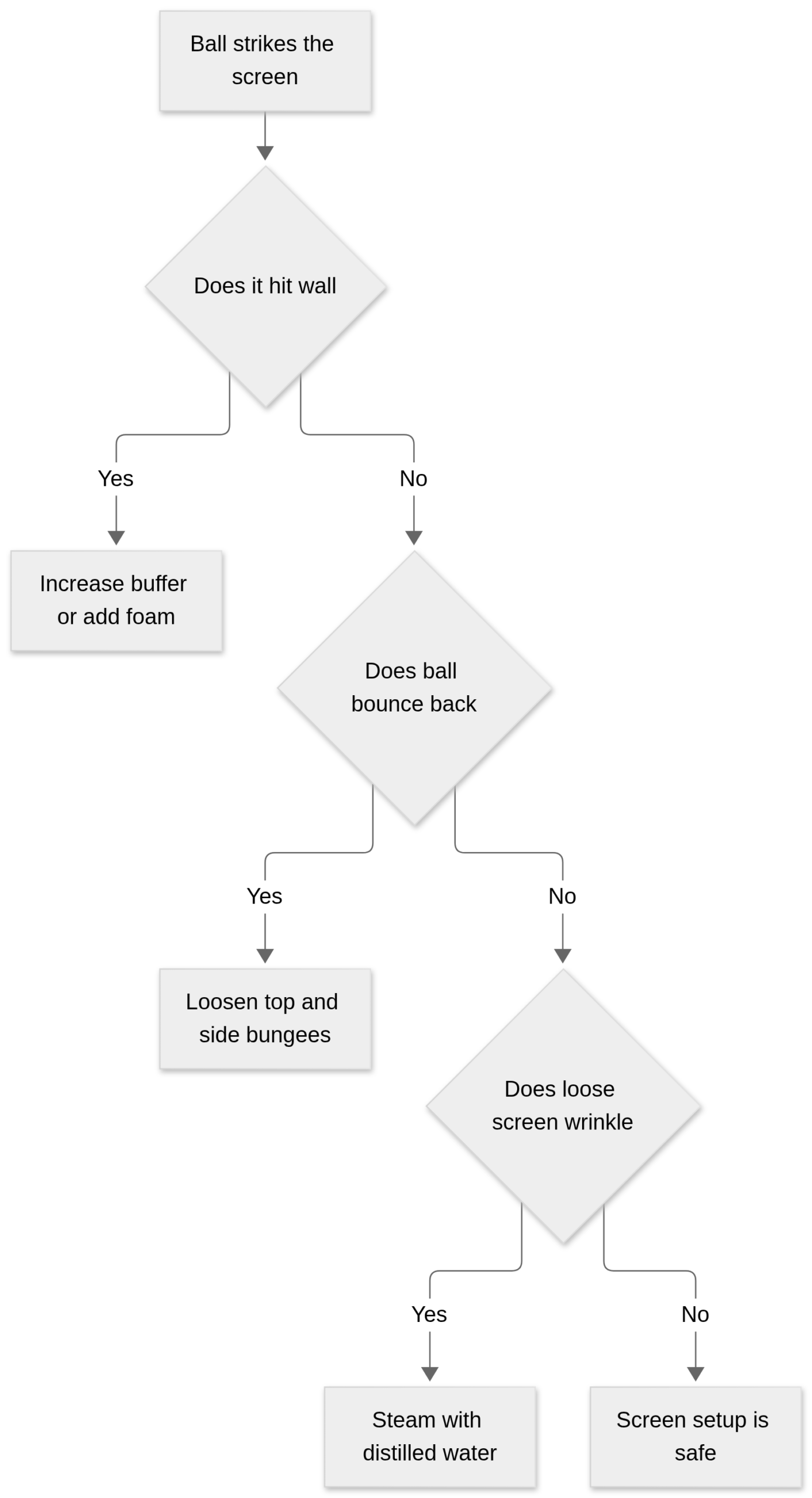
This flowchart outlines the steps to test and adjust your screen safely.
Why your screen acts like a trampoline
Tightly tensioned screens reflect kinetic energy straight back at you instead of absorbing the impact. Thin, basic vinyl materials present a significantly higher safety concern. They have a dangerous rebound rate compared to tightly woven polyester mesh or triple-layer poly spacer fabrics, according to Canvas ETC.
A commercial indoor golf lounge might install basic vinyl screens and tighten them entirely with zip ties. This removes all wrinkles for maximum 4K image quality. However, when customers hit drives into the screen, the material acts like a springboard. The operator must swap to triple-layer poly spacer screens to soften the bounce with a slight ripple.
The tension trade-off for clear graphics
You cannot dial in your bungees just to get a perfectly flat projection surface. You must balance image quality against letting the material catch the ball safely. According to Elevated Golf Simulators, you should loosen the top corner bungees and the middle side bungees. Stop when the screen shows a soft ripple upon impact rather than sounding like a gunshot.
If loosening the screen causes it to sag or wrinkle, do not tighten the bungees again. Instead, Carl’s Place recommends using a consumer-grade steamer filled with distilled water. This safely removes wrinkles without risking heat damage from a traditional iron.
Leaving a gap behind the screen
Your screen needs empty air behind it to stretch upon impact. According to Carl’s Place, you should install impact screens 12 to 16 inches in front of any hard wall. This gap creates an adequate safety buffer. If you skip this, the ball will push the screen into the concrete and rocket back at your shins.
Even with a proper gap, your standing position matters. According to Carl’s Place, golfers should stand at least 10 feet away from the screen when swinging to avoid injury.
What to do in tight floorplans
Many homeowners build DIY simulators in compact garages where a 16-inch buffer is physically impossible. If you only have 8 inches of space between the screen and the concrete foundation, the ball will hit the wall. You solve this by adding layered backing materials.
You can hang an archery baffle net and memory foam a few inches behind the screen. This deadens the impact within a very tight footprint.
The Foam Factory recommends using 3LB density memory foam as a backing material. It absorbs shock and slows down ball rebounds. You will likely need to cut this foam from standard mattress sizes, as simulator-specific options do not exist.
Stopping wedge shots from climbing the ceiling
High-lofted wedge shots create a unique bounce-back hazard. According to Carl’s Place, wedge shots tend to travel up the screen rather than bounding straight back. They then roll backward aggressively along the enclosure’s ceiling.
A golfer practicing their short game might notice balls flying back over their head from the ceiling frame. You can fix this by adding overhead ceiling safety baffles. These fabric strips catch the climbing ball as it rolls back and drop it safely down to the turf.
Walk over to your simulator today and inspect the top corners and middle side bungees. Loosen them slightly and take a test swing to see if the fabric ripples softly on impact. If you need help finding the right backing materials for your custom space, contact the team at GimmeGolfSim today.